A 4-bay NAS for family archive backups hits the sweet spot between capacity, redundancy, and price, but the seven models I compared here take very different routes to get there. The UGREEN DXP4800 Plus earns my best overall pick for families thanks to its approachable software, quiet operation, and hardware that handles photo libraries and automated backups without fuss. If you want storage ready on day one, the BUFFALO TeraStation Essentials 32TB bundle and the QNAP TS-473A with four IronWolf drives included remove drive-shopping entirely, while budget-conscious builders should look at the Asustor Drivestor 4 Pro Gen2. The main tradeoff in this category is convenience versus control: bundled units cost more per terabyte, whereas diskless models like the AOOSTAR WTR PRO trade simplicity for raw power and flexibility. Keep reading for the full breakdown of where each model wins and where it falls short.

Get smart everyday buys delivered free with Prime
- Fast, free delivery on millions of items
- Prime Video, Amazon Music and more included
- Member-only deals all year
Key Takeaways
- Bundled-storage models (BUFFALO TeraStation, QNAP TS-473A) dominated on out-of-box readiness but carried the weakest CPUs per dollar, making them best for pure archival rather than media-heavy family use.
- UGREEN won best overall largely on software experience: its setup flow was the only one designed from the ground up for non-technical households, where QNAP and Asustor assume some networking comfort.
- The AOOSTAR WTR PRO blurred the NAS/mini PC line completely — the Ryzen 7 5825U outclassed every dedicated NAS here, but buyers accept DIY software setup in exchange for that power.
- Within the Asustor lineup, the price ladder from Drivestor 4 Pro to AS5404T to Lockerstor 4 Gen3 mapped almost directly to 2.5GbE maturity, RAM ceiling, and NVMe support — the middle AS5404T was the value sweet spot.
- Every 4-bay option here supports RAID 5, so the real differentiators for family archives became rebuild behavior after a drive failure, photo backup app quality, and how easily a spouse or teen could restore files.
| BUFFALO TeraStation Essentials 2025 4-Bay Desktop NAS 32TB with Hard Drives Included |  | Best Plug-and-Play Pick | Capacity: 32TB (drives included) | Drive Bays: 4 | RAID Support: RAID 0, 5, 6 | VIEW ON AMAZON | See Our Full Breakdown |
| Asustor Drivestor 4 Pro Gen2 AS3304T v2 – 4-Bay NAS, 1.7GHz Quad-Core, 2GB DDR4 RAM, 2.5GbE (Diskless) | 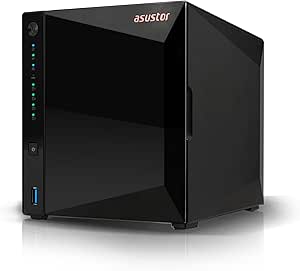 | Best Budget Diskless Option | Drive Bays: 4 (diskless) | Processor: Realtek 1.7GHz Quad-Core | RAM: 2GB DDR4 | VIEW ON AMAZON | See Our Full Breakdown |
| Asustor AS5404T 4-Bay NAS (Diskless) |  | Best for Photo Libraries and Media | CPU: Intel Celeron N5105 Quad-Core 2.0GHz (10nm) | Drive Bays: 4 (diskless) | M.2 Slots: 4 x NVMe SSD | VIEW ON AMAZON | See Our Full Breakdown |
| UGREEN DXP4800 Plus 4-Bay NAS for Families, Creators & Small Teams |  | Best Premium Performance | Max Capacity: 144TB | Processor: Intel 5-Core CPU | RAM: 8GB DDR5 | VIEW ON AMAZON | See Our Full Breakdown |
| QNAP TS-473A 4-Bay NAS with AMD Ryzen V1500B, 32TB Bundle (4x Seagate IronWolf 8TB) |  | Best Power-User Bundle | CPU: AMD Ryzen Embedded V1500B 4-Core/8-Thread 2.2GHz | RAM: 8GB DDR4 | Drive Bays: 4 | VIEW ON AMAZON | See Our Full Breakdown |
| Asustor Lockerstor 4 Gen3 AS6804T 4-Bay NAS (Diskless) |  | Best Premium Performance | Processor: AMD Ryzen 3.8GHz Quad-Core | RAM: 16GB ECC DDR5 @ 4800 MHz | Bays: 4 (diskless) | VIEW ON AMAZON | See Our Full Breakdown |
| AOOSTAR WTR PRO 4+2 Bay NAS Mini PC, AMD Ryzen 7 5825U, Dual 2.5G LAN, Barebone |  | Best for DIY Tinkerers | Processor: AMD Ryzen 7 5825U, 8C/16T, up to 4.5GHz | Drive Bays: 4 SATA + 2 M.2 NVMe | Max Storage: 96TB | VIEW ON AMAZON | See Our Full Breakdown |
| bay nas for family archive backup | Drive Bays | Warranty | RAM | Processor |
|---|---|---|---|---|
| BUFFALO TeraStation Essentials | 4 | 3 years | — | — |
| Asustor Drivestor 4 Pro Gen2 A | 4 (diskless) | — | 2GB DDR4 | Realtek 1.7GHz Quad-Core |
| Asustor AS5404T 4-Bay NAS | 4 (diskless) | — | 4GB DDR4-2933 | — |
| UGREEN DXP4800 Plus 4-Bay NAS | — | 2 years | 8GB DDR5 | Intel 5-Core CPU |
| QNAP TS-473A 4-Bay NAS with AM | 4 | 2 years | 8GB DDR4 | — |
| Asustor Lockerstor 4 Gen3 AS68 | — | 3 years spare parts | 16GB ECC DDR5 @ 4800 MHz | AMD Ryzen 3.8GHz Quad-Core |
| AOOSTAR WTR PRO 4+2 Bay NAS Mi | 4 SATA + 2 M.2 NVMe | 24 months | — | AMD Ryzen 7 5825U, 8C/16T, up to 4.5GHz |
More Details on Our Top Picks
BUFFALO TeraStation Essentials 2025 4-Bay Desktop NAS 32TB with Hard Drives Included
Most 4-bay options in this roundup arrive diskless, leaving you to research drives and handle RAID setup yourself. The TeraStation Essentials flips that: it shows up with four pre-installed drives and RAID pre-configured, so a family archive can be running the same evening it’s unboxed. Compared with the Asustor Drivestor 4 Pro Gen2, you give up app ecosystems and upgrade flexibility, but you gain simplicity that less technical households will appreciate. The 2.5GbE port keeps transfers brisk, and 256-bit encryption plus a 3-year warranty back up the reliability pitch.
The tradeoff is a fairly closed box. If you eventually want multimedia apps, SSD caching, or 10GbE like the UGREEN DXP4800 Plus offers, this platform will feel limiting. It’s an appliance, not a project.
Pros:- Pre-installed 32TB of drives with RAID already configured
- 2.5GbE networking for fast backups out of the box
- 256-bit drive encryption for sensitive family documents
- 3-year warranty and TAA-compliant Japanese build
Cons:- Limited app and multimedia ecosystem compared with Asustor or QNAP
- Default RAID 5 setup — changing modes requires reconfiguration
- No SSD caching or 10GbE expansion path
Best for: Families who want a ready-to-run archive with drives included and zero assembly fuss
Not ideal for: Tinkerers who want Docker, VMs, or an expandable app platform — this is a closed appliance
- Capacity:32TB (drives included)
- Drive Bays:4
- RAID Support:RAID 0, 5, 6
- Network Interface:2.5GbE
- Encryption:256-bit drive encryption
- Warranty:3 years
- Compliance:TAA, Made in Japan
Our verdict“Buy this if you want family archives protected the day the box arrives — skip it if you see your NAS as a hobby platform.”
Asustor Drivestor 4 Pro Gen2 AS3304T v2 – 4-Bay NAS, 1.7GHz Quad-Core, 2GB DDR4 RAM, 2.5GbE (Diskless)
For buyers comfortable picking their own drives, this Asustor undercuts nearly everything here on total cost while still covering the essentials. The 2.5GbE port matches what the BUFFALO TeraStation Essentials offers, and tool-free drive bays mean installation takes minutes without a screwdriver. Full RAID 5 and RAID 6 support gives a growing family archive real fault tolerance, and Asustor’s apps handle remote access and personal cloud duties well for a budget box.
The catch is the 1.7GHz Realtek CPU and 2GB of RAM. Against the Asustor AS5404T’s Intel chip and NVMe slots, this model is strictly a file-and-backup machine — heavy media transcoding or containers will stall it. And unlike the BUFFALO, you’re buying drives separately and building the array yourself.
Pros:- 2.5GbE networking uncommon at this price point
- Tool-free drive bays make first-time installation painless
- Full RAID 0/1/5/6/JBOD support for protected family archives
- Solid personal cloud and remote access apps
Cons:- 2GB RAM limits multitasking and any containerized apps
- Ships diskless — factor in four drives before comparing prices
- Realtek CPU is weak for transcoding or heavy media workloads
Best for: Budget-conscious buyers who already own or will source NAS drives and mainly need backup and file sharing
Not ideal for: Households wanting media transcoding, photo AI features, or Docker — the CPU and 2GB RAM can’t carry that load
- Drive Bays:4 (diskless)
- Processor:Realtek 1.7GHz Quad-Core
- RAM:2GB DDR4
- Network:2.5GbE Ethernet
- RAID Support:RAID 0, 1, 5, 6, JBOD
- Installation:Tool-free drive bays
Our verdict“The smart pick if you want protected family backups at the lowest hardware cost and don’t need muscle.”
Asustor AS5404T 4-Bay NAS (Diskless)
Family archives are rarely just documents — they’re decades of photos and videos. This is where the AS5404T pulls ahead of its cheaper sibling, the Drivestor 4 Pro Gen2: the Intel N5105 handles photo indexing and media streaming far more gracefully, and four M.2 NVMe slots let you add SSD caching so browsing a 100,000-photo library stays snappy instead of grinding on spinning disks. Dual 2.5GbE ports can be link-aggregated for faster aggregate throughput than any single-port option here.
The 4GB of RAM is workable but not generous — heavier Docker use will push against it, and the UGREEN DXP4800 Plus doubles that with DDR5. There’s also no 10GbE path, so bandwidth peaks lower than the UGREEN despite the strong feature set. Drives, as usual, come separately.
Pros:- Four M.2 NVMe slots for SSD caching that speeds up huge photo libraries
- Dual 2.5GbE ports with aggregation support
- Efficient 10nm Intel quad-core CPU well suited to media tasks
- Three USB 3.2 Gen 2 ports for fast external archive offloads
Cons:- 4GB RAM may need upgrading for heavier multitasking
- No 10GbE option unlike the UGREEN DXP4800 Plus
- Diskless — four drives plus optional NVMe drives add to the bill
Best for: Families whose archive is photo- and video-heavy and who want fast browsing and streaming
Not ideal for: Buyers wanting a one-shot purchase — drives and any NVMe cache drives add real cost on top
- CPU:Intel Celeron N5105 Quad-Core 2.0GHz (10nm)
- Drive Bays:4 (diskless)
- M.2 Slots:4 x NVMe SSD
- RAM:4GB DDR4-2933
- Ethernet:2 x 2.5GbE
- USB:3 x USB 3.2 Gen 2 (10 Gbit/s)
Our verdict“The best middle ground for media-rich family archives — more capable than budget models without the premium price of a 10GbE rig.”
UGREEN DXP4800 Plus 4-Bay NAS for Families, Creators & Small Teams
When the archive doubles as a creative workspace, this UGREEN makes the strongest case in the lineup. The 10GbE port dwarfs the 2.5GbE connections on the Asustor models, pushing transfers toward 1250 MB/s — enough that restoring a full family archive stops being an overnight job. With 8GB of DDR5 RAM, Docker, and virtual machines, it’s the only option here that comfortably runs AI-powered photo organization alongside backups, and capacity scales to 144TB as the archive grows across generations.
Those capabilities cost you. It’s diskless like the Asustors, and its ceiling of 144TB raw means less usable protected space. There’s no Wi-Fi, and the 2-year warranty is shorter than BUFFALO’s 3 years. For pure backup duty, this is more machine than a family needs — which is exactly why it earns the premium slot rather than the top spot for typical buyers.
Pros:- 10GbE plus 2.5GbE networking for dramatically faster transfers and restores
- 8GB DDR5 RAM supports Docker, VMs, and AI photo organization
- Up to 144TB raw capacity for multi-decade archives
- Encryption and permission management for multi-user family access
Cons:- Wired Ethernet only — no Wi-Fi option
- Diskless with a premium hardware price before any drives are added
- Real-world speeds depend heavily on the rest of your network gear
Best for: Creators and tech-comfortable families who want backup, media, Docker, and AI photo tools on one fast box
Not ideal for: Buyers who just need set-and-forget backups — the 10GbE hardware and app stack are wasted money there
- Max Capacity:144TB
- Processor:Intel 5-Core CPU
- RAM:8GB DDR5
- Network Ports:1x 10GbE, 1x 2.5GbE
- Internal SSD:128GB
- Drive Form Factors:2.5-inch and 3.5-inch SATA
- Warranty:2 years
Our verdict“Pick this if your NAS is a workstation as well as an archive; skip it if backups are the whole job.”
QNAP TS-473A 4-Bay NAS with AMD Ryzen V1500B, 32TB Bundle (4x Seagate IronWolf 8TB)
This QNAP splits the difference between the plug-and-play BUFFALO and the do-it-yourself Asustors: it arrives with four 8TB IronWolf drives installed, yet still runs a full enthusiast platform underneath. The Ryzen V1500B with 8 threads outmuscles everything else in this batch, and two PCIe Gen 3 slots mean you can add a 10GbE card later rather than paying for it upfront as you do with the UGREEN. The dual 2.5GbE ports trunk to 5 Gbps out of the box, and the M.2 slots support SSD caching and Qtier auto-tiering.
The tradeoffs are real: it’s priced like the hardware it contains, the 8GB of RAM is a starting point rather than a ceiling for virtualization, and being locked into the bundled 8TB drives shapes your RAID layout from day one. QNAP’s OS also assumes some willingness to learn.
Pros:- Ryzen 4-core/8-thread CPU delivers the strongest processing power in the lineup
- PCIe Gen 3 slots allow affordable 10GbE expansion later
- M.2 NVMe slots for SSD caching and Qtier auto-tiering
- Bundled 4x 8TB IronWolf drives for 32TB of immediate archive space
Cons:- Premium price typical of Ryzen-based NAS hardware
- 8GB RAM may need upgrading for heavy virtualization
- Bundled drives limit flexibility if you planned larger or mixed capacities
Best for: Hands-on users who want drives included but refuse to give up expansion, caching, and 10GbE upgrade paths
Not ideal for: Set-and-forget households — the premium hardware and QNAP’s deeper interface are overkill for simple backups
- CPU:AMD Ryzen Embedded V1500B 4-Core/8-Thread 2.2GHz
- RAM:8GB DDR4
- Drive Bays:4
- Included Drives:4x Seagate IronWolf 8TB (32TB total)
- Network:2x 2.5GbE RJ45 (5 Gbps trunked)
- Expansion:2x PCIe Gen 3 slots, 2x M.2 NVMe slots
- Operating Systems:QTS and QuTS hero
- Warranty:2 years
Our verdict“The pick for buyers who want a loaded, ready-to-run archive that can still grow into a 10GbE powerhouse.”
Asustor Lockerstor 4 Gen3 AS6804T 4-Bay NAS (Diskless)
If your family archive also includes raw video projects, photo libraries in the tens of terabytes, or a small business on the side, this option stands out as the muscle pick. The Ryzen quad-core with ECC DDR5 is a different league from the Asustor Drivestor 4 Pro Gen2 — data integrity checks happen at the memory level, which matters when a backup job runs overnight for years. Compared with the UGREEN DXP4800 Plus, the dual 5GbE and 10GbE ports make it far better prepared for multi-user households pulling large files at once. The four M.2 NVMe slots can serve as ultra-fast cache for archive access. The tradeoff is real: it ships diskless, the hardware is overkill for pure photo-and-document backups, and the price of admission buys capability many families will never touch.
Pros:- ECC DDR5 memory adds hardware-level data protection for long-running backup jobs
- Dual 5GbE plus 10GbE networking keeps large file transfers fast even with multiple users
- Four M.2 NVMe slots allow caching or fast storage tiers as the archive grows
- Compact desktop chassis fits a shelf despite workstation-class internals
Cons:- Diskless — drives are a separate, sizable expense before the first backup runs
- Enterprise-grade specs are wasted money for casual home archiving
- ADM ecosystem is smaller than Synology’s, so third-party app support is thinner
Best for: Tech-savvy households or home-based creators who want a future-proof archive that can double as a media editing and virtualization server
Not ideal for: Families who just need automated photo and document backups — the QNAP TS-473A bundle with drives included gets there for less setup and money
- Processor:AMD Ryzen 3.8GHz Quad-Core
- RAM:16GB ECC DDR5 @ 4800 MHz
- Bays:4 (diskless)
- M.2 Slots:4 NVMe
- Network:Dual 5GbE & 10GbE ports
- Operating System:ASUSTOR Data Master (ADM)
- Warranty:3 years spare parts
Our verdict“Buy this only if your family archive demands editing-grade speed and ECC reliability; otherwise a mid-tier 4-bay covers the same backup basics for far less.”
AOOSTAR WTR PRO 4+2 Bay NAS Mini PC, AMD Ryzen 7 5825U, Dual 2.5G LAN, Barebone
This is the pick for the household where one person wants to build the system, not just buy it. Unlike the Asustor AS5404T or the BUFFALO TeraStation, the WTR PRO arrives as a barebone mini PC — you choose the RAM, the drives, and crucially the operating system, whether that’s TrueNAS, Ubuntu, Unraid, or even Windows. The Ryzen 7 5825U with eight cores outmuscles most purpose-built NAS CPUs in this roundup, and the 4 SATA + 2 M.2 layout gives you flexible tiering for a growing archive. Running 24/7 at 15-25W, it’s cheap to keep powered for nightly backups. The tradeoffs suit only patient buyers: setup is entirely on you, and Linux users may need to tweak SATA link power management to avoid CRC errors — a fix that requires comfort with udev rules, not something a plug-and-play buyer should take on.
Pros:- Choose your own OS — TrueNAS, Ubuntu, OpenWrt, or Windows — with no vendor lock-in
- 8-core/16-thread Ryzen 7 handles backups, containers, and virtualization simultaneously
- Up to 96TB of storage plus dual NVMe slots leaves long runway for a growing archive
- 15-25W power draw makes 24/7 operation inexpensive
Cons:- Barebone — RAM, storage, and OS all purchased and configured separately
- Linux SATA power management can cause CRC errors or slowed drives unless manually tuned
- No dedicated NAS software suite, so family-friendly backup apps depend entirely on what you install
Best for: Linux-comfortable hobbyists who want full control over OS, storage layout, and want one box to serve as NAS, soft router, and home server
Not ideal for: Anyone who wants backups working the same evening it arrives — pre-built options like the QNAP TS-473A bundle include drives and a ready OS out of the box
- Processor:AMD Ryzen 7 5825U, 8C/16T, up to 4.5GHz
- Drive Bays:4 SATA + 2 M.2 NVMe
- Max Storage:96TB
- Memory:Dual DDR4 SO-DIMM, up to 64GB (not included)
- Network:Dual Intel 2.5G LAN
- Power Consumption:15W-25W
- Operating Systems:Windows 10/11, Ubuntu, OpenWrt, OPNsense
- Warranty:24 months
Our verdict“The WTR PRO rewards tinkerers with unmatched flexibility per dollar, but families wanting turnkey backups should let it pass.”

How We Picked
I judged each unit against what a family archive actually demands: years of unattended reliability, painless phone and laptop backups, and enough headroom to survive a drive failure without losing irreplaceable photos. That meant weighing RAID behavior and drive accessibility, the quality of mobile backup apps, noise and power draw for a unit living in a living room or hallway closet, and whether a model arrived with drives or left that choice to you. Raw throughput mattered less than you might expect — a family archive rarely saturates even a single gigabit link — but CPU and RAM determined how smoothly each system handled photo indexing, backups from multiple devices, and RAID rebuilds.
The ranking logic follows a simple split. Models that paired competent hardware with genuinely family-friendly software ranked above spec monsters that assumed an IT background. Bundled configurations earned credit for removing the most common beginner mistake (mismatched drives), but were marked down where the included hardware limited long-term flexibility. Value was measured over a five-year horizon: total cost including drives, expandability, and whether the platform could grow as kids’ media collections and backup volumes inevitably double.
| bay nas for family archive backup | Processor |
|---|---|
| BUFFALO TeraStation Essentials | — |
| Asustor Drivestor 4 Pro Gen2 A | Realtek 1.7GHz Quad-Core |
| Asustor AS5404T 4-Bay NAS | — |
| UGREEN DXP4800 Plus 4-Bay NAS | Intel 5-Core CPU |
| QNAP TS-473A 4-Bay NAS with AM | — |
| Asustor Lockerstor 4 Gen3 AS68 | AMD Ryzen 3.8GHz Quad-Core |
| AOOSTAR WTR PRO 4+2 Bay NAS Mi | AMD Ryzen 7 5825U, 8C/16T, up to 4.5GHz |
Factors to Consider When Choosing 4 Bay Nas For Family Archive Backups
Before settling on a specific model, it helps to understand the broader decisions that shape a family archive build. These are the factors that separated smart purchases from expensive regrets across the seven units I compared.Bundled Drives vs. Diskless: The Real Cost Math
The most common mistake families make is comparing a bundled unit’s price against a diskless chassis and assuming the diskless option is a bargain. Once you add four matching drives, a warranty you actually trust, and the time spent researching compatibility lists, the gap narrows or disappears. Bundles win when you value a single point of support — if something fails, one vendor handles it. Diskless wins when you want specific drives, plan to migrate existing drives, or intend to expand with NAS-grade 16TB+ models later. A middle path many families miss: buy a diskless unit and a single-drive external USB backup, then fill the bays gradually as budget allows.
RAID Is Not a Backup — Plan for Two Copies
Every 4-bay unit here supports RAID 5, which protects against a single drive dying, but RAID does nothing against deletion, ransomware, fire, or a failed firmware update. A family archive needs the NAS plus an independent second copy — either an external drive rotated offsite or a cloud sync of the truly irreplaceable folders. When choosing a model, check whether it includes native cloud sync and snapshot support; snapshots caught before an accidental mass deletion can save a decade of photos. Models with Btrfs file systems handle this better than older ext4-only platforms, a distinction that rarely appears on a spec sheet but matters enormously in a crisis.
Who Will Actually Use It?
Be honest about the least technical person who needs to interact with the NAS. If a partner needs to pull up vacation photos or a teenager needs to restore a school project, the software experience matters more than transfer speeds. Platforms with polished mobile apps and simple shared-folder permissions justify their premium; raw-power units running general-purpose operating systems put every convenience on you to configure and, later, to troubleshoot remotely over the phone. Setup friction on day one predicts support friction for years. This single question eliminated several otherwise excellent units from top consideration for family households.
Noise, Power, and Where It Lives
A 4-bay NAS runs 24/7, so its placement drives requirements. In a hallway closet, almost anything works. On a shelf near the TV room, drive vibration and fan whine become nightly irritations, and models with plastic chassis amplify both. Expect idle power draws between roughly 20 and 50 watts depending on CPU — over a year, that difference shows on your electric bill. Ryzen-based units like the mini PC hybrids trade higher idle draw for serious compute; ARM and efficient Intel platforms sip power but struggle with heavy photo indexing. Match the platform to the workload, not the benchmark chart.
Future-Proofing Without Overpaying
Family archives grow faster than anyone predicts — 4K phone video alone can add 100GB per year, per person. Look for 2.5GbE networking and NVMe slots even if your current router is gigabit, because those features are cheap today and painful to retrofit. RAM expandability matters more than installed RAM, since photo indexing and multi-user backups are memory-hungry in ways a spec sheet won’t reveal. That said, resist paying for 10GbE or eight-core CPUs for a pure archive; that money is better spent on drives or a second backup target. Future-proof the storage platform, not the processor.
Drive Selection and Replacement Strategy
If you go diskless, buy four identical NAS-rated drives — mixing consumer desktop drives with a 24/7 workload is the fastest route to premature failure and confusing RAID drops. IronWolf and WD Red class drives include vibration sensors tuned for multi-bay enclosures, and that difference is real, not marketing. Stagger your purchases slightly or buy from different batches to avoid four drives from the same production run failing in the same month. Finally, keep one confirmed-compatible spare drive in a drawer; when a bay fails at 11pm on a Sunday, being able to start the rebuild immediately is worth far more than the drive’s cost.
Frequently Asked Questions
Is 4 bays overkill for a family, or should I save money with 2 bays?
For a genuine multi-year family archive, 4 bays earns its place for one reason: RAID 5 with a hot spare or RAID 6 protection. A 2-bay unit in mirrored RAID survives one drive failure, but the rebuild process stresses the surviving drive, and a second failure during that window ends the archive. Four bays let you run RAID 5 with better capacity efficiency, keep a spare bay for growth, or split archive duties from active working storage. The price premium over 2-bay units is modest; the resilience difference is structural. Only choose 2 bays if your entire archive fits comfortably on a single drive with a second copy living elsewhere.
How much usable storage do I actually get from a 32TB 4-bay bundle?
Less than the box suggests, and planning around this prevents disappointment. Four 8TB drives in RAID 5 yield roughly 24TB of usable space, because one drive’s worth of capacity goes to parity. Format overhead and the operating system partition trim that slightly further. That 24TB still holds an enormous archive — well over a million photos — but families shooting 4K video should model their growth rate honestly. The better question is whether you’d prefer that bundle’s simplicity over buying a diskless unit and four 12TB or 16TB drives, which changes the usable capacity math considerably at a similar total cost.
Can a NAS mini PC like the AOOSTAR WTR PRO really replace a traditional NAS?
Functionally, yes — the Ryzen 7 hardware easily outperforms every dedicated NAS in this lineup, and the extra 2.5-inch bays give it storage flexibility none of the others match. The catch is that nothing is preconfigured: you’ll install and maintain a NAS operating system yourself, handle your own backups of that configuration, and accept that family members can’t rely on polished vendor apps. For a household with one technically inclined person, it’s arguably the most capable option here. For a household where that person might be the one who needs the backup restored, a purpose-built NAS with vendor support is the safer long-term bet.
What happens when one drive fails — will my family lose photos?
In a healthy RAID 5 or RAID 6 setup, a single drive failure is an inconvenience, not a catastrophe — the array keeps running and you swap in a matching drive to rebuild. The risks come from two places: a second drive failing during the multi-hour rebuild, and families who never notice the first failure because they ignored the notification emails. Set up alert notifications to at least two people’s phones on day one, and keep a spare or a quick purchasing plan ready. And remember the earlier point: if the archive matters, the NAS itself is only one copy. RAID buys you uptime and recovery time, not immunity from every failure mode.
Do I need 2.5GbE networking if my home network is only gigabit?
Not today, but the answer changes depending on how long you plan to keep the unit. A family archive’s routine traffic — phone backups, photo browsing, document sync — saturates nothing near even gigabit speeds. Where 2.5GbE pays off is local bulk transfers: initial archive migrations, restoring everything after a failure, or editing video directly off the NAS. Since a quality 4-bay NAS typically serves a household for five to seven years, and 2.5GbE switches are already inexpensive, buying it now is cheap insurance against retrofitting later. I’d treat it as a tiebreaker between otherwise equal models rather than a must-have feature.
Conclusion
The right choice depends less on specs and more on who lives with the machine. For most families, the UGREEN DXP4800 Plus is my best overall pick: it balances quiet operation, expandable hardware, and software that non-technical household members can actually navigate. The Asustor Drivestor 4 Pro Gen2 is the best value for budget-conscious buyers willing to add their own drives, while the Asustor AS5404T is the smart middle step up if you want NVMe caching headroom without the premium tier’s price.
For beginners who want zero assembly, the BUFFALO TeraStation Essentials 32TB bundle removes every decision — buy it, plug it in, start backing up that evening. The QNAP TS-473A bundle is the best premium all-in-one, pairing an 8GB Ryzen platform with matched IronWolf drives for households that will grow into its capabilities. And for the specific need of raw power plus storage, the AOOSTAR WTR PRO is unbeatable if someone in the house enjoys running a DIY system. The Asustor Lockerstor 4 Gen3 AS6804T rounds out the lineup for enthusiasts who want flagship dedicated-NAS hardware and plan to keep it a decade. Whatever you choose, remember the golden rule: the NAS is one copy — pair whichever model you pick with an offsite or cloud backup of the photos you truly cannot lose.
Halloween Picks

Gemmy Bluey Family Halloween Inflatable Scene, 5.5 ft Lighted Yard Decoration

Thuodo 8 FT Tall Halloween Inflatable Three-Headed Dragon with LEDs

Star Wars Yoda and R2-D2 Inflatable Halloween Decor, 6 ft with LEDs, Indoor/Outdoor
As an affiliate, we earn on qualifying purchases.